
Purchasing and suppliers
Purchasing and supplier management, from order to delivery
Order from suppliers with a clear record, and check every delivery against what you asked for before it goes on the shelf.
Problems it solves
Orders with no record
An order placed by phone leaves nothing to check the delivery against.
Deliveries that do not match
Short or missing items are noticed late, or not at all.
Supplier details on one phone
When the person who orders is away, nobody knows who to call.
How it works
Supplier details are kept in one place with the business. When stock runs low, you raise a purchase order listing the products and quantities you need.
When the delivery arrives, goods receiving records what actually came in against that order. Short lines are visible straight away, and received items are added to your stock.
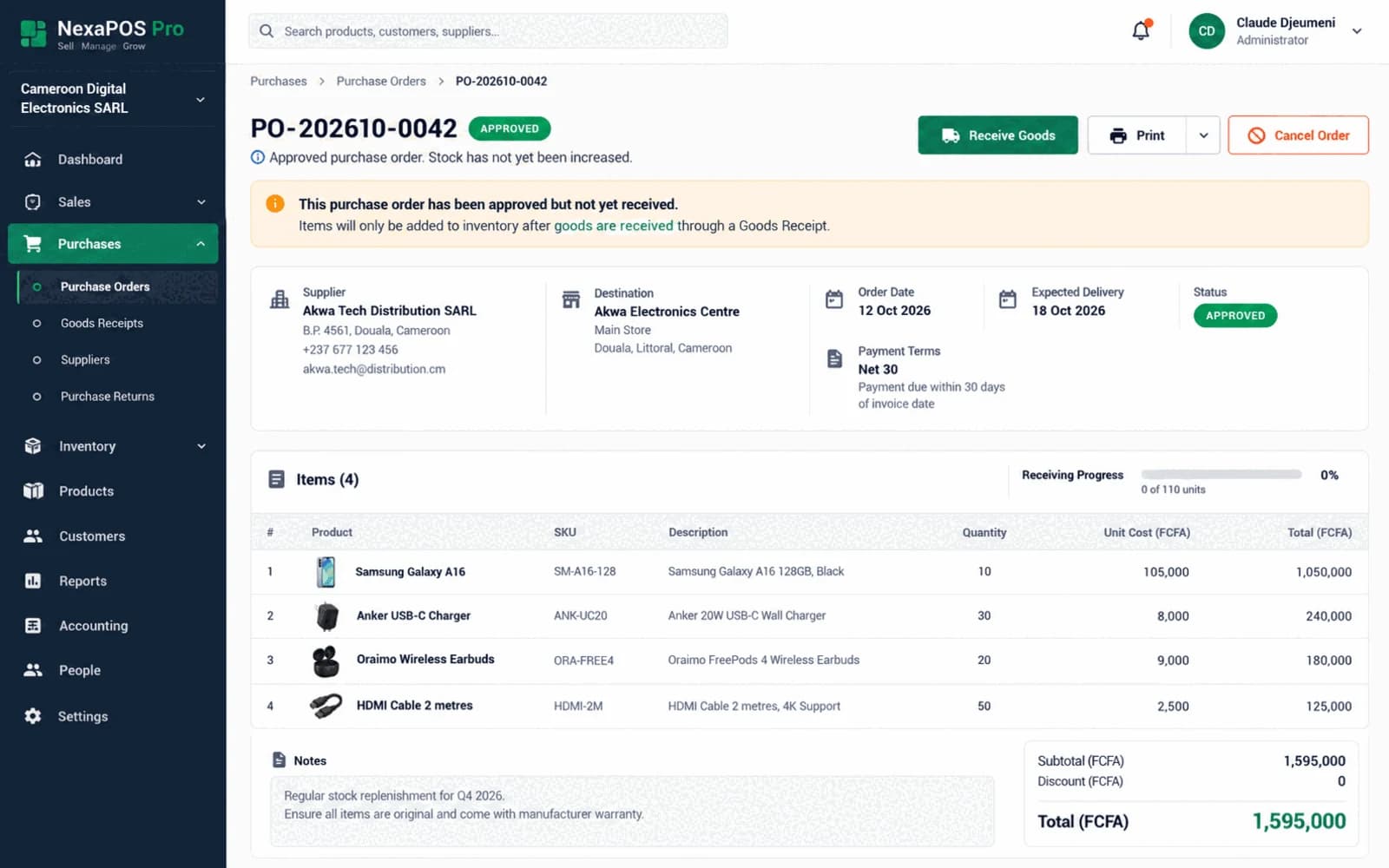
Screenshot 1 of 2: A purchase order to a supplier
Restocking a best seller
Step 1: A reorder alert shows the item is running low.
Step 2: Raise a purchase order to the supplier with the quantities you need.
Step 3: When the goods arrive, record what was received against the order.
Step 4: Received items are added to stock and appear in the movement history.
Step 5: Review ordered against received if a line came in short.
What it includes
Purchase orders
Raise orders to suppliers with products and quantities.
Supplier records
Keep supplier details in one place, for the whole team.
Goods receiving
Record what actually arrived when deliveries land.
Ordered versus received
Keep a record of the difference between the order and the delivery.
Linked to stock
Received goods update stock and its movement history.
Purchasing controls
Keep purchasing in check with dedicated controls.
Purchase-order recommendations
With ML Insights, switched on per business: recommendations that become draft purchase orders for you to review, and supplier performance insights.
Before you start
Prerequisites and limits
- Suppliers and the products you buy from them need to be set up first.
- Deliveries must be recorded when they arrive for stock figures to stay accurate.
Included in
Starter, Growth, Multi-Branch plans. Pricing depends on your branches and terminals.
Compare plansWhat changes for your business
For owners
- A record of every order and what actually arrived
- Supplier details that stay with the business
- Stock that reflects real deliveries
For stock staff
- A clear list to check when goods arrive
- One place to look up a supplier
- No separate delivery notebook to keep
Common questions
Can I see what I ordered against what arrived?
Yes. Goods receiving records the delivery against the purchase order, so short or missing lines are on record.
Does receiving goods update my stock?
Yes. Received items are added to stock and show in the product's movement history.
Related features
Useful for
Further reading
Know that every delivery matches the order.
Book a free demo and we will walk through a purchase order and delivery with your kind of suppliers.