
Multi-branch management
Multi-branch management from one place
Run several shops with the same clarity as one, without phoning each branch for the day's figures.
Problems it solves
Calling round for numbers
The day's sales arrive late, by phone, and are hard to check.
Different habits in every shop
Each branch records sales and stock its own way.
Stock in the wrong place
One branch runs out of what another has too much of.
How it works
Every branch runs on the same NexaPOS setup. Sales, stock, shifts and staff activity are recorded per branch, so you can compare branches side by side or look at one in detail.
Role-based access gives each person the access their role needs, and branches and terminals are licensed as you add them.
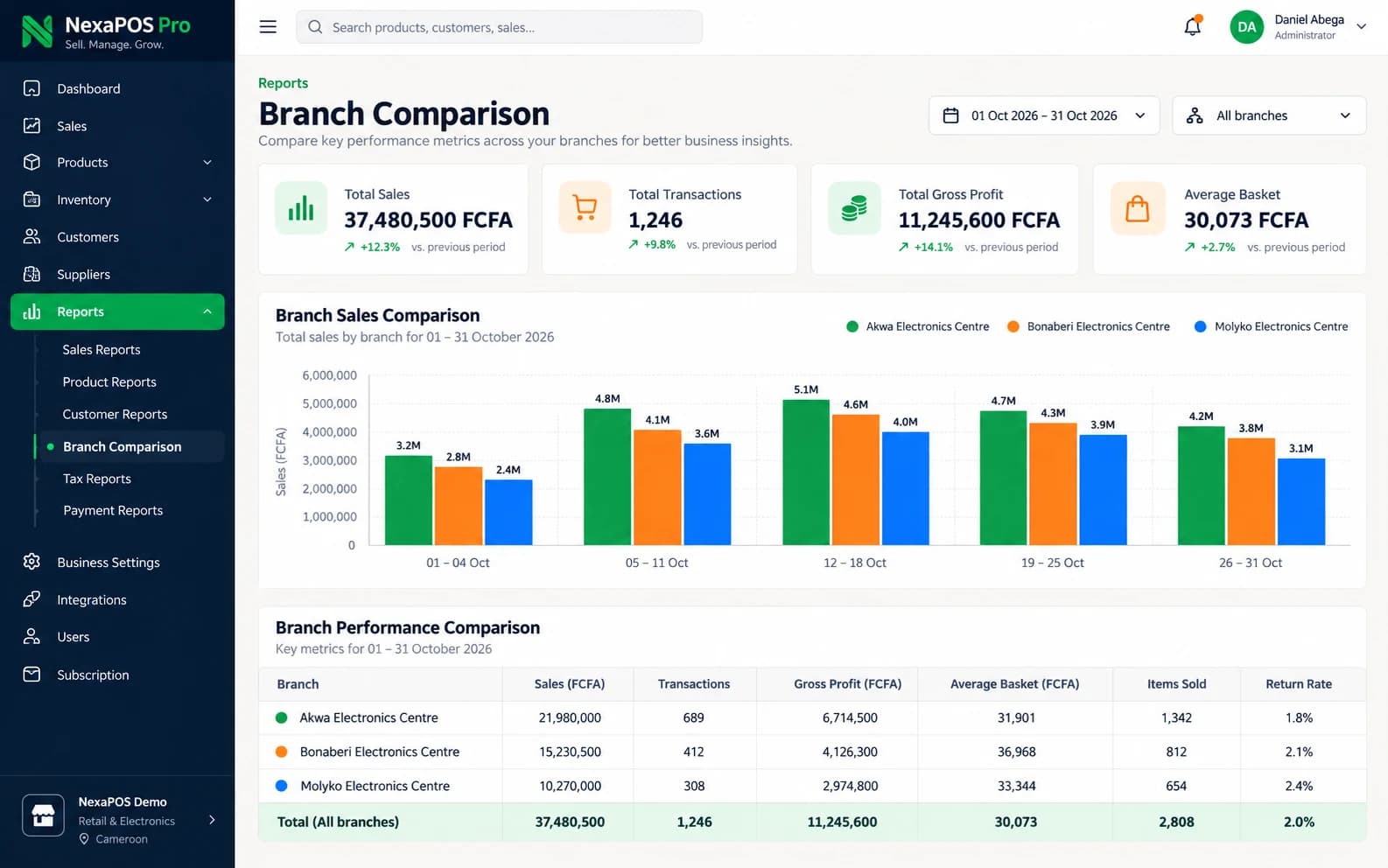
An owner's morning check
Step 1: Open the branch comparison for yesterday.
Step 2: Spot the branch with lower sales or a cash variance.
Step 3: Check that branch's stock for items running low.
Step 4: Review the shifts and staff activity behind its numbers.
Step 5: Call the branch manager with specific questions, or reorder for that branch.
What it includes
Branch performance
Compare branches side by side.
Stock per branch
Check each branch's stock without phoning the shop.
Shifts and cash per branch
Keep cash accountable at every location.
Staff activity
See what each team has been doing.
Branch and terminal licensing
Add branches and terminals as the business grows.
Active branch on the Overview
The NexaPOS Overview shows which branch you are working in.
Branches kept apart
Each branch's data is kept separate, with access controlled by role.
Before you start
Prerequisites and limits
- Branches and terminals are licensed, so your price depends on how many you run.
- Branch reports depend on each branch recording its sales, deliveries and shifts in NexaPOS.
What changes for your business
For owners
- Visibility without waiting for reports
- The same standards at every branch
- A setup ready for the next branch
For branch managers
- Clear figures for the branch they run
- The same workflow when staff move between shops
Common questions
How many branches can NexaPOS handle?
NexaPOS is built for retailers with one to five branches. Branches and terminals are licensed as you add them, so tell us your plans and we will quote accordingly.
Can I compare branches side by side?
Yes. Branch performance reporting compares branches over the same period.
Related features
Useful for
Further reading
Run every branch with the same clarity.
Book a free demo and we will show the multi-branch view for a setup like yours.