
Inventory management
Inventory management that shows what is really on the shelf
Stop guessing what is on the shelf. Keep one catalogue and one stock record for every branch, updated by every sale and delivery.
Problems it solves
Stock counts in notebooks
Paper records fall behind the moment the shop gets busy.
Best sellers running out
You find out an item is gone when a customer asks for it.
Money tied up on shelves
Without a stock value, slow movers quietly hold cash you could use elsewhere.
How it works
Every product lives in one catalogue with its category, variants such as size or colour, label and barcode. Stock is held against a branch or storage location.
Sales, deliveries and adjustments are recorded as stock movements, so you can see where each item came from and where it went. Reorder alerts warn you before an item runs out, and stock valuation shows what your shelves are worth.
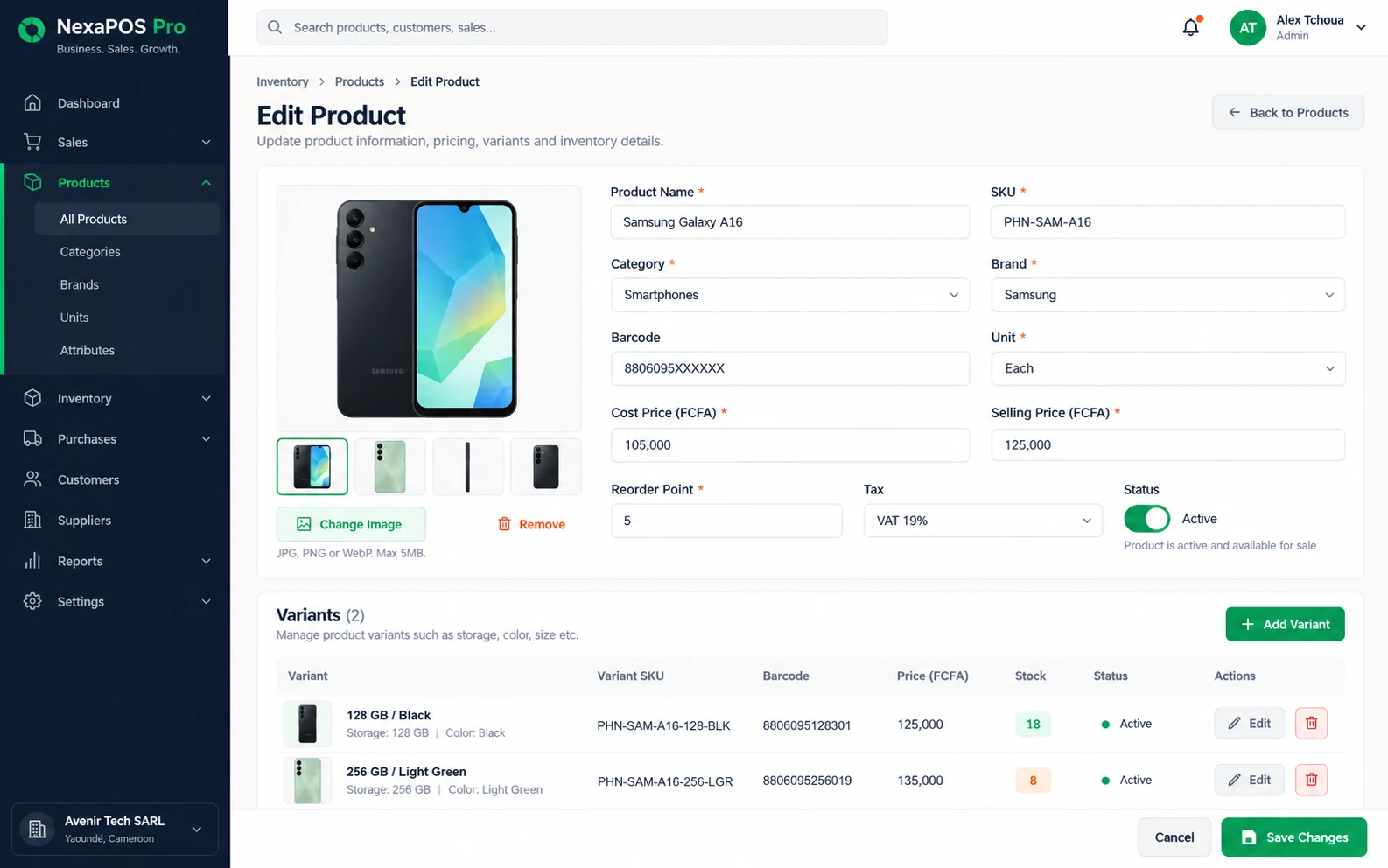
Screenshot 1 of 3: Adding a product with variants and a barcode
From new product to reorder
Step 1: Add the product with its category, variants and barcode, and print a label if it needs one.
Step 2: Record the stock held at each branch or storage location.
Step 3: Every sale reduces the stock and appears in the product's movement history.
Step 4: When the item runs low, a reorder alert flags it.
Step 5: Raise a purchase order and record the delivery when it arrives.
What it includes
Categories and variants
Organise products and manage sizes, colours and other options.
Labels and barcodes
Print labels and scan barcodes for fast handling.
Stock locations
Track stock by branch or storage location.
Movement history
See every sale, delivery and adjustment behind a stock figure.
Reorder alerts
Get warned before an item runs out.
Stock valuation
See the value of what you are holding.
Cycle counts
Count stock a section at a time instead of closing for a full stocktake.
Inventory intelligence
Insight into stock, with demand forecasts by product and category through ML Insights, switched on per business.
Before you start
Prerequisites and limits
- Your product list and opening stock need to be entered before stock figures can be relied on. We plan this with you during setup.
- Stock is only as accurate as what is recorded: deliveries and adjustments must be entered in NexaPOS as well as sales.
- Printing labels needs a compatible printer; confirm your hardware with us.
Included in
Starter, Growth, Multi-Branch plans. Pricing depends on your branches and terminals.
Compare plansWhat changes for your business
For owners
- A clear view of what to reorder
- Stock value without a full count
- One stock picture across your branches
For shop staff
- Find a product by its barcode instead of searching
- Answer “do we have it?” quickly
- A movement record to check when a count does not match
Common questions
Can I manage sizes, colours and other options?
Yes. Variants keep sizes, colours and other options under one product. We show how they are set up for your products in a demo.
Can I see stock for each branch separately?
Yes. Stock is tracked by branch or storage location, so you can check one shop or the whole business.
Can I bring in my existing product list?
Ask us in a demo. We will look at how your products are recorded today and plan how to get them into NexaPOS.
Related features
Useful for
Further reading
Bring your stock under control.
Book a free demo and we will show the catalogue, stock movements and reorder alerts on products like yours.