
Point of sale
Point of sale that keeps the counter moving
Give cashiers a checkout that is quick to learn and hard to get wrong, so queues move and every sale is recorded against the person who made it.
Problems it solves
Queues at busy times
Adding up by hand or hunting for prices slows every sale while customers wait.
Discounts without control
When anyone can change a price, margin leaks away and nobody can say where.
Sales with no record
Without a receipt and a named cashier, mistakes and disputes are hard to trace.
How it works
Each sale is built in a cart: the cashier scans or picks products, adjusts quantities, applies a promotion or discount within your rules and selects the customer if they have a profile.
When the customer pays, NexaPOS records the sale with a receipt and the cashier's name, and the sale feeds straight into stock, loyalty and your reports.
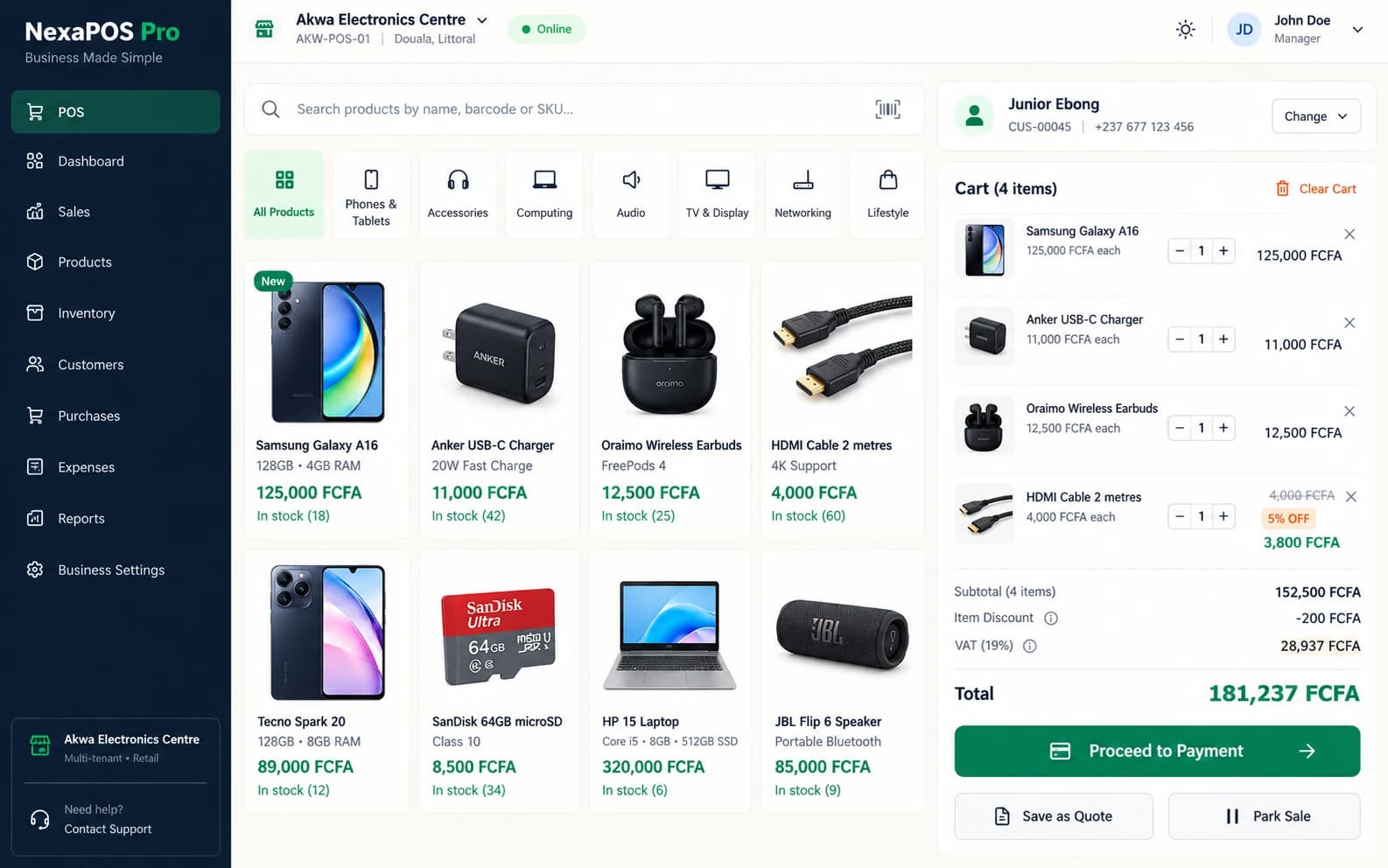
Screenshot 1 of 2: Checkout with a sale in progress
A typical sale at the counter
Step 1: The cashier scans each item's barcode or picks it from the product list.
Step 2: They adjust quantities and apply any promotion or discount your settings allow.
Step 3: If the customer has a profile, the cashier selects it so the sale counts towards their history and loyalty.
Step 4: The customer pays. Gift cards, vouchers and loyalty rewards can be redeemed, or the sale recorded on credit against the customer.
Step 5: A receipt is issued and the sale is recorded against the cashier and their shift.
What it includes
Cart management
Build and adjust a sale before it is completed.
Barcode support
Scan products straight into the sale.
Controlled pricing
Apply promotions and discounts in a controlled way.
Receipts
Give every customer a clear record of their purchase.
Gift cards and vouchers
Sell and redeem them at the same checkout.
Customer credit
Record a sale on credit against a customer profile.
Loyalty redemption
Let customers redeem rewards on the spot.
Staff accountability
Every sale is tied to the team member and shift that handled it.
Receipt paper sizes
Print on 58 mm or 80 mm rolls, or on A5, A4 and Letter paper.
Branded and digital receipts
Add your logo and colours to receipts, and share receipts digitally.
Before you start
Prerequisites and limits
- Products and prices need to be set up before the first sale. We plan this with you during onboarding.
- Barcode scanning needs a compatible scanner. Tell us what hardware you have and we will confirm what works with it.
- The payment methods you record depend on your setup; we confirm them with you in the demo.
Included in
Starter, Growth, Multi-Branch plans. Pricing depends on your branches and terminals.
Compare plansWhat changes for your business
For owners
- Every sale tied to a cashier and a shift
- Discounts applied within the rules you set
- Sales that update stock, loyalty and reports without re-typing
For cashiers
- No prices to memorise or add up by hand
- A clear receipt to hand every customer
- Gift cards, vouchers and loyalty handled at the same counter
Common questions
Can I control which discounts cashiers give?
Yes. Promotions and discounts are applied in a controlled way, so cashiers work within the rules you set. We show the options in a demo.
Can customers buy on credit?
Yes. A sale can be recorded on credit against the customer's profile, and credit aging in your reports shows who owes what and for how long.
Does checkout keep working if the internet drops?
Offline-capable checkout for eligible sales. Eligible sales can be captured during a connection loss and synchronized safely later. We confirm which sales are eligible for your setup.
Related features
Useful for
Further reading
See checkout running on your own products.
Book a free demo and we will walk through the counter workflow for your kind of store.